Meet Ayrus - My Self-Hosted AI Agent Running on Proxmox
Most AI assistants live in the cloud, behind someone else’s infrastructure and someone else’s rules.
Ayrus was built differently.
Ayrus is my self-hosted AI agent running inside a dedicated Ubuntu VM on Proxmox. It acts as my personal assistant, server manager, and cyber lab partner, accessible through Telegram from anywhere.
The goal was not just to install another AI tool. The goal was to build an assistant that understands my homelab, my infrastructure, my workflows, and my cybersecurity lab environment.
Overview
Ayrus is a self-hosted personal AI agent built on Hermes Agent by Nous Research, an open-source, MIT-licensed project.
The setup consists of:
- Dedicated Ubuntu VM on Proxmox as the host
- OpenAI Codex OAuth as the primary model connection
- Llama 3.1 8B via Ollama as local fallback
- Telegram as the mobile interface
- GitHub private repo for nightly brain backup
- Pantheon personas for specialized roles
- Dedicated agent identity for independent operation
Architecture
1
2
3
4
5
6
7
8
9
OpenAI model via Codex OAuth (primary)
Llama 3.1 8B via Ollama (fallback)
          ↓
Hermes Agent on Ubuntu VM on Proxmox
          ↓
Private GitHub Repo (nightly backup)
Pantheon Personas (4 specialized agents)
          ↓
Telegram (mobile access from anywhere)
1. Creating the Ubuntu VM
Ayrus runs in a dedicated VM, completely isolated from lab VMs, with its own resources.
VM configuration:
| Setting | Value |
|---|---|
| OS | Ubuntu 24.04 LTS |
| CPU | 4 cores |
| RAM | 8GB |
| Disk | 100GB on ZFS pool |
| Network | vmbr0 |
A dedicated VM keeps things clean. If something breaks, only Ayrus is affected.
After installation, extend the LVM partition to use the full disk:
1
2
sudo lvextend -l +100%FREE /dev/mapper/ubuntu--vg-ubuntu--lv
sudo resize2fs /dev/mapper/ubuntu--vg-ubuntu--lv
2. Installing Hermes Agent
Hermes installs with a single command:
1
curl -fsSL https://hermes-agent.nousresearch.com/install.sh | bash
The installer walks through everything interactively.
Key settings:
| Setting | Value |
|---|---|
| Provider | OpenAI Codex |
| Terminal backend | Local |
| Sudo support | Enabled |
| Max iterations | 150 |
| Compression threshold | 0.8 |
| Session reset | Inactivity + Daily at 2 AM |
| Background service | System service (auto-starts on boot) |
Setting it as a system service means Ayrus starts automatically with no manual intervention needed after a reboot.
3. Connecting via OpenAI Codex OAuth
Hermes supports OpenAI Codex OAuth, which lets you authenticate using an existing ChatGPT subscription instead of separate API billing.
During setup, select OpenAI Codex as the provider. It generates a URL, you sign in with your ChatGPT account, paste back a verification code, and authentication is complete. The OpenAI model becomes the agent’s brain without separate API billing in this setup.
4. Setting Up Telegram
Hermes connects to Telegram through BotFather:
- Open Telegram and search for BotFather
- Run
/newbotand follow the steps to create a bot - Copy the bot token and paste it during Hermes setup
- Get your Telegram user ID from
@userinfobotand add it as the allowed user
From this point, the agent is accessible from any device, anywhere.
5. GitHub Private Repo for Brain Backup
Ayrus builds knowledge over time. Memories, skills, personas, preferences. Losing that to a crashed VM is not acceptable.
The solution is automatic nightly backup to a private GitHub repo.
Create a GitHub Personal Access Token with repo and workflow scopes, then add it safely:
1
echo "GITHUB_TOKEN=your_token_here" >> ~/.hermes/.env
Then tell Ayrus on Telegram:
1
2
3
Set up a private GitHub repo called "ayrus-brain" to backup your
memory, skills, and soul files every night at midnight.
I've added GITHUB_TOKEN to ~/.hermes/.env
Ayrus creates the repo, sets up the cron, and pushes the first backup, all on his own. If the VM ever needs to be rebuilt, restore the repo and the agent picks up exactly where it left off.
Backed up nightly:
- Memory files (MEMORY.md, USER.md)
- SOUL.md
- All skills
- Pantheon personas
6. Pantheon Personas
The Pantheon lets you create multiple specialized AI personas, each with their own system prompt, personality, and role.
Four personas were created:
| Persona | Purpose |
|---|---|
| Cyber Lab / Red Team Lab | Attack simulations on authorized lab VMs only |
| Server Admin | Proxmox infrastructure and self-hosted services |
| Researcher | Threat intelligence, CVE tracking, morning briefings |
| Assistant | Daily tasks, coding help, writing, general questions |
Cyber Lab / Red Team Lab
Focus:
- Recon and enumeration
- Exploitation paths
- Active Directory attack simulation
- Impact analysis and reporting
Guardrails: Explicitly scoped to owned and authorized systems. Asks for confirmation before any destructive action.
Server Admin
Focus:
- VM and storage management
- Docker and Compose stacks
- systemd services
- Logs, health checks, and resource monitoring
- Backup and rollback planning
Researcher
Focus:
- Morning briefings
- RSS feed monitoring
- CVE tracking
- Source-grounded summaries
Assistant
Focus:
- Coding and debugging
- Writing and planning
- General questions
- Small automations and reminders
Invoke personas directly in Telegram:
1
2
3
4
/personality cyber-lab
/personality server-admin
/personality researcher
/personality assistant
Persona files live at ~/.hermes/pantheon/personas/ and are backed up nightly.
7. Proxmox SSH Access
To give Ayrus the ability to manage the Proxmox host, a dedicated user was created on the host with its own SSH key pair. This keeps things clean and auditable, separate from any personal account.
First, tell Ayrus to generate a key pair:
1
Generate an SSH key pair for Proxmox access
Ayrus generates the key pair and provides the public key. Then on the Proxmox host as root:
1
2
3
4
5
6
adduser --disabled-password --gecos "Ayrus AI Assistant" ayrus
mkdir -p /home/ayrus/.ssh
echo 'ssh-ed25519 <AYRUS_PUBLIC_KEY>' | tee /home/ayrus/.ssh/authorized_keys
chown -R ayrus:ayrus /home/ayrus/.ssh
chmod 700 /home/ayrus/.ssh
chmod 600 /home/ayrus/.ssh/authorized_keys
Install sudo and configure passwordless access:
1
2
3
apt install sudo -y
echo 'ayrus ALL=(ALL) NOPASSWD:ALL' > /etc/sudoers.d/ayrus
chmod 440 /etc/sudoers.d/ayrus
Then tell Ayrus the Proxmox host IP and port to test the connection. He connects, verifies access, and saves the connection details for future server admin tasks.
This gives Ayrus controlled administrative access through a dedicated, revocable user account.
8. Ollama as Local Fallback
OpenAI Codex OAuth has daily usage limits. To keep Ayrus always available, Ollama with Llama 3.1 8B was added as a local fallback.
1
2
curl -fsSL https://ollama.com/install.sh | sh
ollama pull llama3.1:8b
Increase context length for better tool use:
1
2
3
4
5
sudo mkdir -p /etc/systemd/system/ollama.service.d
printf '[Service]\nEnvironment="OLLAMA_CONTEXT_LENGTH=32768"\n' | \
sudo tee /etc/systemd/system/ollama.service.d/context.conf
sudo systemctl daemon-reload
sudo systemctl restart ollama.service
Then tell Ayrus to configure it as fallback and auxiliary model.
Model routing:
| Role | Model | Purpose |
|---|---|---|
| Primary | OpenAI via Codex OAuth | Conversations, reasoning, complex tasks |
| Fallback | Llama 3.1 8B | When primary hits rate limits |
| Auxiliary | Llama 3.1 8B | Background tasks, compression, summarization |
9. Agent Identity
A capable agent needs its own identity, not sharing yours.
A dedicated Gmail account was created specifically for Ayrus. The idea is straightforward: just like a new employee gets their own work email, the agent gets its own account to operate from.
This gives Ayrus his own presence on the internet:
- Registering for tools and services he needs
- Accessing sites that require authentication
- Subscribing to research feeds and newsletters
- Handling account-based automations
Everything the agent does through this account is separate from personal accounts, auditable, and easy to revoke if needed.
The account is connected to Ayrus via Gmail App Password, stored securely in the .env file and never passed through chat.
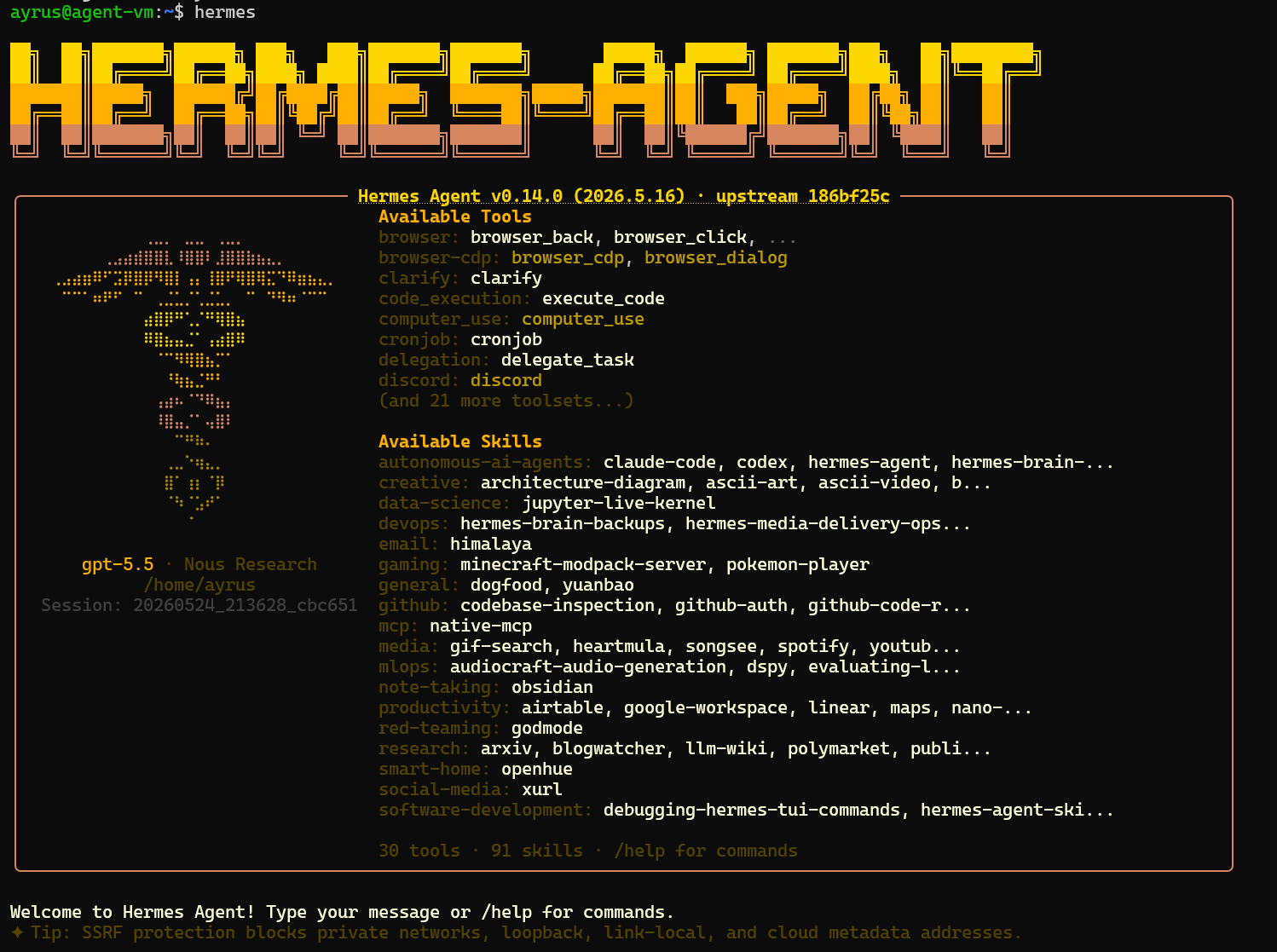
10. Hermes Commands and Dashboard
Useful Commands
1
2
3
4
5
6
7
8
hermes                  # start CLI chat session
hermes setup            # reconfigure settings
hermes config edit      # edit config file directly
hermes update           # update to latest version

# Gateway management
systemctl --user restart hermes-gateway.service
systemctl --user status hermes-gateway.service
Hermes Dashboard
Hermes has a built-in web dashboard for monitoring sessions, models, cron jobs, and skills. Since the agent runs on a remote VM, access it via an SSH tunnel:
1
ssh -J root@<proxmox-ip> -L 9119:localhost:9119 ayrus@<agent-vm-ip>
Then open in the browser:
1
http://127.0.0.1:9119
The dashboard shows active models, total sessions, connected platforms, cron jobs, and the full skills library.
What Ayrus Can Do Now
- Answers questions and assists with daily tasks via Telegram
- Manages infrastructure via SSH using his own dedicated user
- Switches between 4 specialized personas on demand
- Writes and improves his own skills over time
- Backs up his entire brain to GitHub every night automatically
- Falls back to local Llama when the primary hits rate limits
- Monitors cybersecurity RSS feeds for threat intelligence
- Operates with his own identity for research and tool access
What Makes This Different
- Core agent runs on personal hardware while using selected cloud services for model access, backup, and remote interaction
- Self-improving loop where skills and memory grow with use
- Multiple specialized personas instead of one generic assistant
- Automatic brain backup that survives VM crashes and rebuilds
- Local fallback model so it never goes fully offline
- Dedicated agent identity with clean separation from personal accounts
Key Takeaways
- A dedicated VM for the agent keeps things clean and isolated
- Never paste API keys or passwords in Telegram, always use the
.envfile - Ayrus is self-healing, tell him what is broken and he fixes it himself
- Start with one agent and let it build skills around your specific workflow
- 8GB RAM is workable but 16GB is more comfortable for local model inference
- The OpenAI Codex OAuth path is the easiest way to get a capable model without API billing
Conclusion
Ayrus is not a finished product. He is designed to keep improving the more he is used. Skills get written and refined. Memory grows. The agent adapts to the workflow.
The setup covered here is the foundation. What gets built on top depends entirely on how it gets used.
This can be extended into scheduled automations, authorized cyber lab workflows, detection engineering pipelines, and infrastructure automations.
The interesting part is not the setup. It is what happens after.